# s05: TodoWrite — 没有计划的 Agent,做着做着就偏了
[中文](README.md) · [English](README.en.md) · [日本語](README.ja.md)
s01 → s02 → s03 → s04 → `s05` → [s06](../s06_subagent/) → s07 → ... → s20
> *"没有计划的 agent 走哪算哪"* — 先列步骤再动手,长任务更不容易漏项。
>
> **Harness 层**: 规划 — 让 Agent 在动手之前先想清楚。
---
## 问题
给 Agent 一个复杂任务:"把所有 Python 文件改成 snake_case 命名,然后跑测试,修好失败。"
Agent 开始干活,改了 3 个文件,跑了个测试,发现 2 个失败,开始修。修着修着,它忘了最初是"改成 snake_case",测试失败把注意力全吸走了。
对话越长越严重:工具结果不断填满上下文,系统提示的影响力被稀释。一个 10 步重构,做完 1-3 步就开始即兴发挥,因为 4-10 步已经被挤出注意力了。
---
## 解决方案
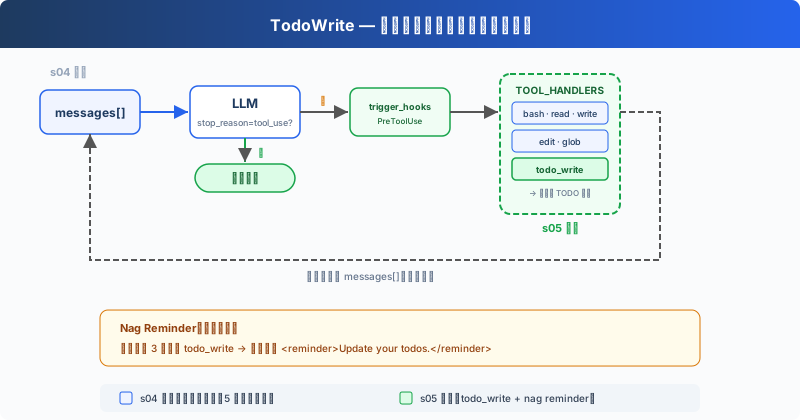
保留上一章的最小 hook 结构,重点看新增的 `todo_write` 工具和 reminder 机制。`todo_write` 本身不做任何实际工作,不能读文件、不能跑命令,只是让 Agent 在动手之前先理清思路。
dispatch 机制不变,新工具仍然走 `TOOL_HANDLERS[block.name]` 分发。但为了演示 todo reminder,循环里加了一个计数器:连续 3 轮没调 `todo_write` 就注入一条提醒。
---
## 工作原理
**todo_write 工具**,接收一个带状态的列表,保存在当前进程内存中,同时在终端显示进度:
```python
CURRENT_TODOS: list[dict] = []
def run_todo_write(todos: list) -> str:
global CURRENT_TODOS
CURRENT_TODOS = todos
lines = ["\n## Current Tasks"]
for t in CURRENT_TODOS:
icon = {"pending": " ", "in_progress": "▸", "completed": "✓"}[t["status"]]
lines.append(f" [{icon}] {t['content']}")
print("\n".join(lines))
return f"Updated {len(CURRENT_TODOS)} tasks"
```
工具定义和其他 5 个工具一起加入 dispatch map:
```python
TOOLS = [
{"name": "bash", ...},
{"name": "read_file", ...},
{"name": "write_file", ...},
{"name": "edit_file", ...},
{"name": "glob", ...},
# s05: 新增一条
{"name": "todo_write", "description": "Create and manage a task list ...",
"input_schema": {
"type": "object",
"properties": {
"todos": {
"type": "array",
"items": {
"type": "object",
"properties": {
"content": {"type": "string"},
"status": {"type": "string", "enum": ["pending", "in_progress", "completed"]},
},
},
},
},
},
},
]
TOOL_HANDLERS["todo_write"] = run_todo_write
```
**Nag reminder**,模型连续 3 轮没调 `todo_write` 时,自动注入一条提醒(教学版机制,CC 源码中没有这个固定轮数逻辑):
```python
if rounds_since_todo >= 3 and messages:
messages.append({
"role": "user",
"content": "Update your todos.",
})
rounds_since_todo = 0
```
Agent 收到任务后的典型流程:先调 `todo_write` 列出所有步骤(全 `pending`)→ 做一个步骤,改成 `in_progress` → 做完改成 `completed` → 看下一个 `pending` → 继续。连续 3 轮没有调用 `todo_write` 时,循环会在下一次 LLM 调用前追加一条 reminder。
**关键洞察**:todo_write 不给 Agent 增加任何**执行能力**。它增加的是**规划能力**。
---
## 相对 s04 的变更
| 组件 | 之前 (s04) | 之后 (s05) |
|------|-----------|-----------|
| 工具数量 | 5 (bash, read, write, edit, glob) | 6 (+todo_write) |
| 规划能力 | 无 | 带状态的 TODO 列表 + nag reminder |
| SYSTEM 提示 | 通用提示 | 加入 "先计划再执行" 引导 |
| 循环 | 不变 | dispatch 不变,新增 rounds_since_todo 计数器和 reminder 注入 |
---
## 试一下
```sh
cd learn-claude-code
python s05_todo_write/code.py
```
试试这些 prompt:
1. `Refactor s05_todo_write/example/hello.py: add type hints, docstrings, and a main guard`(先列 3 步再执行)
2. `Create a Python package under s05_todo_write/example/demo_pkg with __init__.py, utils.py, and tests/test_utils.py`
3. `Review Python files under s05_todo_write/example and fix any style issues`
观察重点:第一次工具调用是不是 `todo_write`?TODO 列了几步?执行过程中状态有没有从 `pending` 变成 `in_progress` / `completed`?
---
## 接下来
Agent 能计划了。但如果一个任务太大,比如"重构整个认证模块",光靠 TODO 列表不够。这个任务本身就是几十个小任务的集合,放在同一个对话里会被上下文淹没。
s06 Subagent → 把大任务拆成子任务,每个子任务派一个独立的 Agent。它们有自己的干净上下文,不会互相污染。
深入 CC 源码
CC 中有两套任务系统并存(`tasks.ts:133-139`):
- **TodoWrite(V1)**:一个简单的列表工具,数据在内存 AppState 中维护(`TodoWriteTool.ts:65-103`)。教学版也保存在进程内存里,退出后清空
- **Task System(V2 = s12)**:文件持久化、依赖图、并发锁、ownership
切换由 `isTodoV2Enabled()` 控制。当前源码的实现逻辑:交互式会话中 V2 默认启用,非交互式会话(SDK)中 V1 默认启用;设置 `CLAUDE_CODE_ENABLE_TASKS` 环境变量可强制启用 V2。注意源码注释 "Force-enable tasks in non-interactive mode" 描述的是 env var 路径的用途,和默认分支的返回值语义不同,阅读时需区分。
教学版省略了真实源码中的 `activeForm` 字段(`utils/todo/types.ts:8-15`)。CC 用它给 UI spinner 展示"正在做什么",教学版只有终端输出,不需要这个字段。
教学版的 nag reminder(3 轮未更新就注入提醒)是教学机制。CC 源码中没有固定的"3 轮"逻辑,更接近的是 `TodoWriteTool.ts:72-107` 中当 3 个以上 todo 全部完成但没有 verification 项时,追加 verification nudge。
Task System 相比 TodoWrite 的核心增量:
- 文件持久化(Claude 配置目录下 `tasks/{taskListId}/{taskId}.json`)而非内存列表
- `blockedBy` 依赖图而非平铺列表
- `proper-lockfile` 并发安全而非无锁
- 四个独立工具(Create/Get/Update/List)而非一个
- TaskCreated / TaskCompleted hooks(`TaskCreateTool.ts:80-129`、`TaskUpdateTool.ts:231-260`)供外部系统集成